
ENTRY
ENTRY
3 min read • 576 wordsFor those participating solely to orienteering, the organizers will provide instructions on how to register for the WMG after you have registered on the Eventor.
If you are considering participating in WMG events other than orienteering, please first register for those events through the WMG entry system and complete the payment. After that, please enter your WMG ID and IOF Eventor account ID in the email form for "To those also participating in other events at WMG2027" section in this page.
WMOC 2027 is being held concurrently with the World Masters Games 2027, just as it was in 2017 and before. Please note that WMG participation fees and accreditation processes are determined by WMG rules and policies and not those of the IOF, and apply equally to all WMG sports. We ask for your understanding and cooperation.
Bulletins
Bulletin 1 is updated as rev.3 at 16 Aug. 2026. Please refer this page.
WMOC2027 orienteering competition entry
Entry for WMOC2027 opens on July 25 at 10:00 AM (JST : UTC + 9 hours). For details, please refer “Perticipate” chapter (Page 14) of bulletin 1 rev.3
There are two ways to participate in orienteering, depending on whether or not you are participating in other WMG events, as shown in the following diagram.
%%{init: {'theme': 'base', 'themeVariables': { 'fontSize': '32px', 'fontFamily': 'Inter'}}}%%
flowchart LR
  subgraph WMOC2027 staff
    F([Create orienteering registration on WMG2027])
  end

  A[Start] --> B

  subgraph Participants
    B([Get IOF Eventor ID]) --> C{Only Orienteering ?}
    C -->|Yes| D[[Registration and paymment at the IOF Eventor]] --> F
    C -->|No| E[[Registration for other events at the WMG site]]
    E --> H([Application via email for orienteering]) -->|email| F
  end

  subgraph WMG2027
    F --> G[(WMG2027 entry registratin)]
  end

    style A fill:#06b6d4,stroke:#fff,stroke-width:2px,color:#000
    style B fill:#10b981,stroke:#fff,stroke-width:2px,color:#000
    style C fill:#06b6d4,stroke:#fff,stroke-width:2px,color:#000
    style F fill:#10b981,stroke:#fff,stroke-width:2px,color:#000
    style H fill:#10b981,stroke:#fff,stroke-width:2px,color:#000
    style D fill:#ef4444,stroke:#fff,stroke-width:2px,color:#fff
    style E fill:#ef4444,stroke:#fff,stroke-width:2px,color:#fff
    style G fill:#ef4444,stroke:#fff,stroke-width:2px,color:#fff
Important
If you register through IOF Eventor, you will not be able to participate in other WMG competitions.
Common requirement
An IOF Eventor account is required. Please refer to the article below and obtain your IOF Eventor ID in advance.
How to register for IOF Eventor
To those participating only WMOC2027 (Orienteering competition)
Please register at the IOF Eventor WMOC2027 event page
Important
Your registration with WMG will be processed as soon as payment is confirmed. Please make your payment promptly upon entry.
To those also participating in other events at WMG2027
Please register to other events at the WMG2027 entry page
Please register your participation by filling out the required information on the email form linked below. Payment and other procedures will be handled via email.
Adding options, including discounts for Japanese citizens
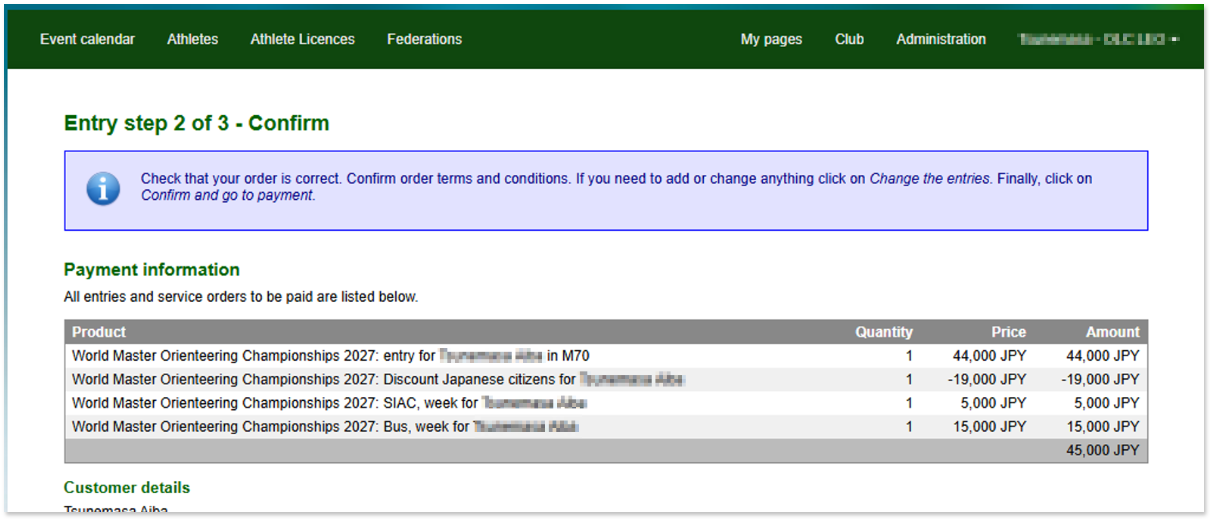
The entry fee for the tournament is 44,000 yen, but various options are available. A discount for Japanese participants is also available as an option, so please be sure to apply if you are eligible.
Tip
For details on option pricing and other information, please refer to Chapter 17 of bulletin 1 rev.3 .
Note
Japanese participants who are eligible for the discount must meet one of the following requirements:
- Individuals who hold Japanese nationality, regardless of whether they reside in Japan or abroad.
- Individuals whose current address is in Japan, regardless of nationality.
Foreign nationals residing in Japan are required to present their residence card at the time of application.
On the entry page, select the player’s name you want to register from “Search by organization,” and then click the cart icon in the list that appears.

Follow these steps:
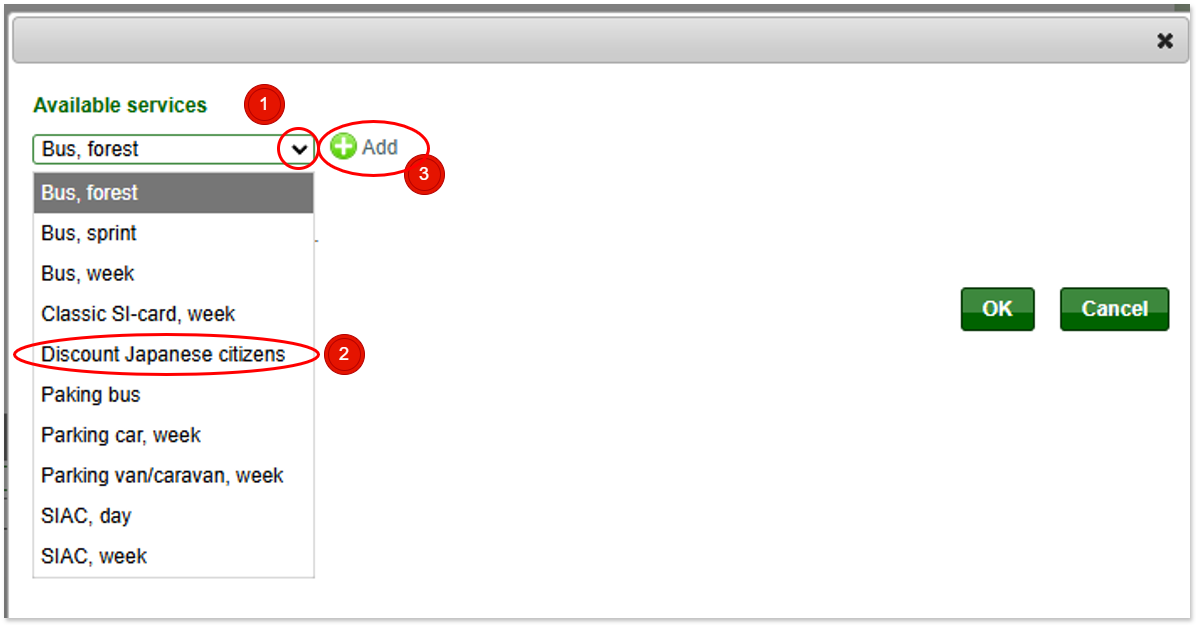
- Open the selection field.
- Select “Discount Japanese citizens” from fields list.
- If you would like to add other options, please press the “+ Add” button.
- Once you have finished adding all the options, please press the OK button. The options editing window will close.
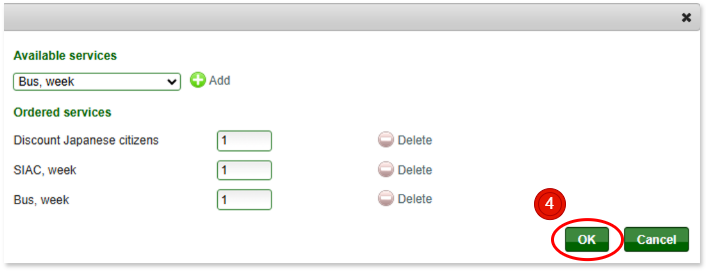
Once you have finished selecting your options and pressed the “Next” button, the payment confirmation screen will appear. Please make sure that “Japanese Discount” is displayed among the items.
Note
Regarding discount options, you are not required to submit documents proving your Japanese citizenship at the time of payment. However, if the WMOC2027 Organizing Committee determines that the discount is not applicable during the application process, we may contact you individually.